
Overview
In version 12.1, Instructors become People Resources with an Instructor role. People Resources have resource calendars associated with them. This allows an administrator to see when Instructors are available. It also allows the instructor to block time from the calendar when they are not available to teach. For example, vacation time.
User Properties
The “Instructor” checkbox has been removed from user properties. In its place is Resource Role. Existing
instructors are created as instructor resources and appear as shown below. Administrators can view the instructor schedule and block time from the User Properties view. Additional roles can be assigned as well.

Class Properties
One of the most notable changes is the assignment of Instructors to the class. In previous releases, the Instructor was assigned on the General Tab near the Location selection. In 12.1, the instructor is now a resource and therefore is assigned in the Resources Tab. A new Resource group has been added for Instructors. Instructors are people resources with the role “Instructor”.
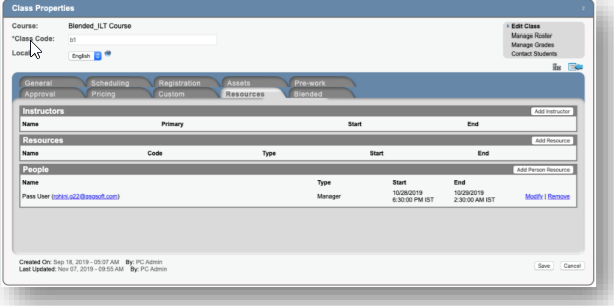
Click the Add Instructor button to add a new instructor. The Manage People Resources search dialog is shown. The location defaults to the location set on the General tab. Click the Any button to remove the location and search globally. By default, the available date range is the start and end date of the class. The date range can be changed to accommodate travel time and other considerations. Click the Go button to apply filter changes.
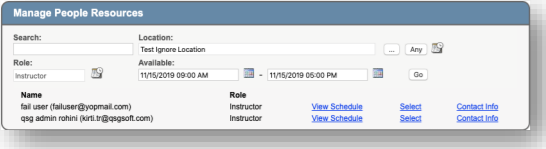
The View Schedule hyperlink allows an administrator to view the instructor’s schedule. Click the Select hyperlink to select the instructor.
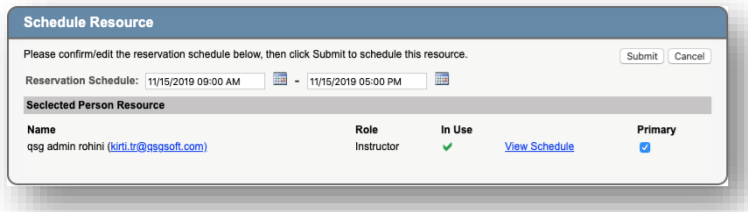
Confirm the resource and date range. Click the Primary checkbox if this is the primary instructor. Click the Submit button to assign the Instructor to the class. The instructor is then shown in the list of instructors.
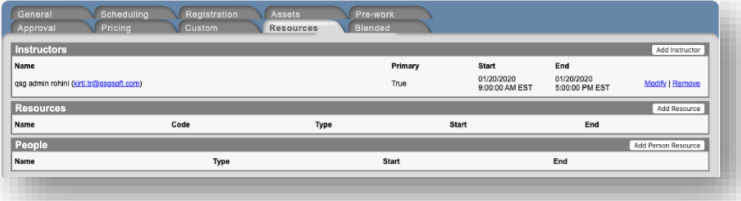
Use the Modify and Remove links to change or remove the instructor from the class.
Instructor FAQ
I was an instructor in the past, am I still an instructor?
Yes, during the upgrade every user that was already an instructor is set up as an instructor resource.
I am setting up a class and I can't add my instructor
Confirm that your user is set up as an instructor.
Confirm that the instructor search is looking for the instructors associated with the correct location (or in all locations.) By default, the instructor search will search for instructors that are associated with the location of the class. If your instructor is not associated with the location, click the “Any” button to open up the search to all instructors.
I want to assign a location to an instructor
Adding a location to an instructor is not required, but can making assigning them to classes easier. To update your instructor, navigate to Resources > Manage People. Once you find your instructor, you can add one or many locations to your instructor’s resource file.
How did the wrong instructor get assigned to a class
The admin who creates a class is automatically set as the primary instructor. If you are setting up a class but are not the instructor, you will be listed as the instructor unless you change it.
I'm trying to add an instructor and it tells me that I dont have access
There are several permissions that have to be set for a user to add instructors. If at any point in the process you receive an error that you don’t have access, alert your campus administrator and they will work with LogicBay to make sure everything is set up correctly for you.
Comments
0 comments
Article is closed for comments.