
Delegates are generally used when you want a quick way to give a colleague access to view training progress for your users. For example, you go on vacation and would like Peter to check on your how your team is progressing with their training.
On the Manage Learning console, the delegate will be able to use Individual Training Progress and Team Progress options to access the teams' training items. Note that the delegate must have a system role with access to the Manage Learning console in order to access these tools.
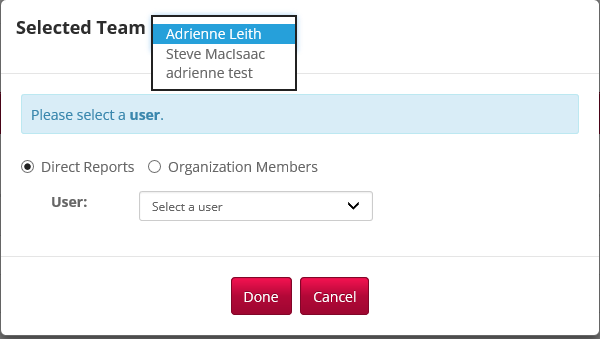
The screenshot below shows the selected team options when clicking on Curricula Progress. When prompted to select a user or a team, the delegate can choose the other manager's team using the Select Team dropdown. The screenshot below shows my own team first and the two other managers that I am a delegate for.
It's important to note that the delegate does not get access to manage your approval requests, training enrollments or goals. It also does not give them access to run reports based on your team. In some cases, you may prefer to just set the delegate up with the same management over your people that you have - this will give them the same reporting access you have as well.
Comments
0 comments
Article is closed for comments.