
The 13.1 release contains the following:
Bug Fixes
- Class Save button is not enabled for instructors when system role only allows instructors to edit classes they teach
- The course catalog search is not returning correct results in German
- Instructor email notifications not sending
- Remote Content Connector not updating user's last access date
- Course catalog report not working when locale set to Spanish
- Class roster audit report not generating
New Features
- Zip code added to Certification and Curriculum Activity report
- Video upload screen instruction changes to make it clearer to end users
- Video analytic data added to analytics data CUBE
- Videos can be shared between campuses
- Video library pagination
- Printable certificates can now be segmented by Campus
- Printable certificates can be restricted by organization
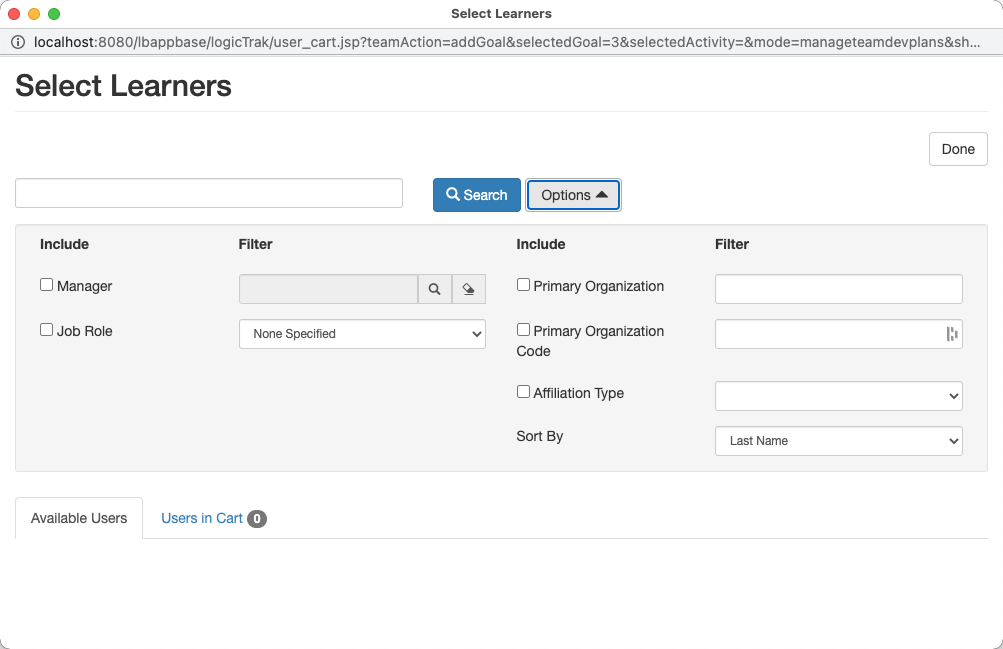
- Team development plan user search can be filtered by Employee Type / Affiliation type
- Remote Content Connector allows connection to ILT courses that have a cost or other restriction
Highlights
Printable certificates can be restricted by organization
In some areas of the world, employers and managers do not want to allow students the option to print their own certificates.
A new configuration setting is added to organizations. This configuration setting is labeled "Do not allow printable certificates". When checked, any user who is a primary member of the organization will lose the ability to print their own certificate.
A new System Role setting is added for "Override Printable Certificates Restriction". When checked, the user can print certificates even if the organization restricts printing certificates.
The use case for this enhancement allows organization managers to print certificates for their managed students while not allowing the students to print the certificates themselves.
Team development plan user search can be filtered by Employee Type / Affiliation type
The Employee Type field is often renamed Affiliation Type. The field is typically a text entry field; however, there is an option to specify a fixed list of values for this field.
For those customers who have chosen to specify a fixed list of values, it is now possible to filter for students using this value when assigning development plans to a team.
Requirements:
- The Campus must specify a fixed list of values
- The User's System Role must allow access to filter based on Employee Type
- A run-time parameter must be passed to the Manage Team Development Plan Page. The run-time parameter name is showEmpTypeFilter and requires a value of "true"
When these conditions are met, the user can filter on Employee Type / Affiliation Code as shown below.
Please open a ticket with our Help Desk team if you wish to implement this option.
Comments
0 comments
Please sign in to leave a comment.